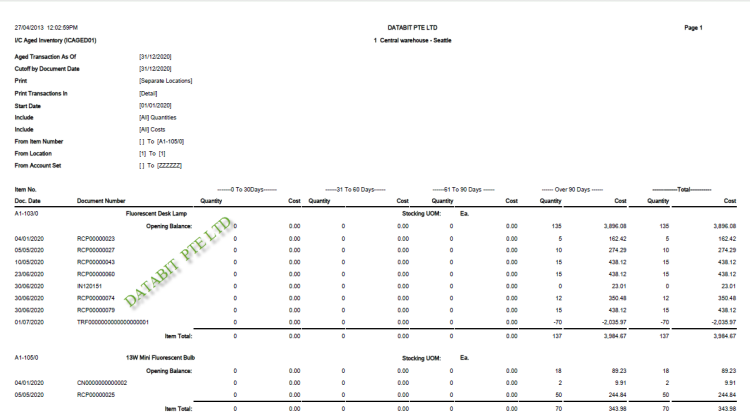

Take Control of Your Inventory with Sage 300 Inventory Control
Sage 300 Inventory Control helps businesses improve stock accuracy, manage inventory movement, track item costs, reduce manual stock tracking and gain better visibility across warehouses, locations and departments.
Why Inventory Control Is Critical for Growing Businesses
Inventory is one of the most important assets for trading, wholesale, distribution and product-based businesses. When stock records are inaccurate or managed using spreadsheets, businesses may face stock shortages, excess inventory, fulfilment delays, poor costing visibility and time-consuming reconciliation work.
Sage 300 Inventory Control helps your business move from reactive stock tracking to proactive inventory management.
With centralised item records, quantity tracking, costing visibility, stock movement history and location-based inventory control, Sage 300 gives your team the information needed to make faster and more confident operational decisions.
Common Inventory Problems Sage 300 Helps Resolve
Sage 300 Inventory Control is designed to help businesses overcome daily stock management issues that affect productivity, customer service, purchasing decisions and profitability.
Inaccurate Stock Balances
When inventory is updated manually, stock balances can quickly become unreliable. Sage 300 helps record receipts, shipments, adjustments, transfers and stock movements in a controlled system so teams can work from more accurate inventory data.
Stock Shortages and Backorders
Without clear visibility into available stock, businesses may accept orders they cannot fulfil on time. Sage 300 helps teams check item availability and monitor inventory levels before sales commitments are made.
Overstocking and Cash Flow Pressure
Excess inventory ties up working capital and increases storage costs. Sage 300 helps businesses review item movement, stock levels and usage trends so purchasing decisions can be made with better visibility.
Poor Visibility Across Locations
Businesses with multiple warehouses, branches or storage areas need to know where stock is located. Sage 300 Inventory Control helps track inventory by location to support better fulfilment and replenishment planning.
Manual Inventory Cost Tracking
Inventory costing becomes difficult when item costs are managed separately or inconsistently. Sage 300 supports structured inventory cost tracking, helping finance teams better understand stock value, margins and cost of goods sold.
Slow Stock Reporting
When inventory records are spread across spreadsheets, reports take longer to prepare and may not reflect current stock positions. Sage 300 helps provide clearer reporting on quantities, movement history, stock value and inventory performance.
Key Capabilities of Sage 300 Inventory Control
Sage 300 Inventory Control provides practical tools to help businesses manage products, stock quantities, item costs, locations and inventory movement more efficiently.
Item Master Management
Maintain detailed item records including item numbers, descriptions, categories, units of measure, pricing information and inventory settings.
Stock Quantity Tracking
Track stock on hand, available quantities, committed quantities and item movement to support better sales, warehouse and purchasing decisions.
Multi-Location Inventory
Manage inventory across warehouses, branches or storage locations so your team can identify where stock is available.
Adjustments and Transfers
Record stock adjustments, transfers between locations and other inventory movements with improved control and traceability.
Inventory Costing
Improve visibility into item costs, stock valuation and cost-related reporting to support finance and management decision-making.
Integration with Sales and Purchasing
Connect inventory information with Order Entry and Purchase Orders to improve fulfilment, replenishment and transaction accuracy.
Still Managing Inventory with Spreadsheets?
If your team is spending too much time checking stock manually, correcting inventory errors or preparing reports from spreadsheets, Sage 300 Inventory Control can help you build a more reliable inventory management process.
How Sage 300 Improves Inventory Workflows
Sage 300 helps create a more connected workflow for inventory planning, stock movement, purchasing, sales fulfilment and financial reporting.
Set Up Structured Item Records
Create organised item master records with consistent item codes, descriptions, categories, units of measure and inventory settings.
Track Stock Movement
Record receipts, shipments, adjustments and transfers so stock balances remain more accurate and easier to trace.
Improve Replenishment Planning
Use inventory visibility to support better purchasing decisions, reduce shortages and avoid unnecessary overstocking.
Connect Inventory with Operations
Link inventory information with sales orders, purchase orders and finance processes to reduce duplicate work and improve reporting accuracy.
Productivity Gains for Your Team
With better inventory visibility and structured stock management, Sage 300 helps teams reduce manual work and make faster operational decisions.
Faster Stock Enquiries
Sales, warehouse and purchasing teams can quickly check item availability, stock location and movement history without relying on manual updates.
Better Warehouse Coordination
Inventory transactions are recorded more consistently, helping warehouse teams improve stock handling, transfers and fulfilment accuracy.
Reduced Spreadsheet Dependency
Centralised inventory records reduce the need for separate stock lists, manual reports and disconnected spreadsheets.
Key Benefits of Sage 300 Inventory Control
Sage 300 Inventory Control helps businesses strengthen stock control while supporting better customer service, cost management and operational efficiency.
- Improve inventory accuracy and reduce stock discrepancies.
- Gain better visibility into item quantities, locations and stock movement.
- Reduce manual spreadsheet-based inventory tracking.
- Support faster sales order fulfilment with clearer stock availability.
- Improve purchasing decisions and reduce stock shortages.
- Identify slow-moving or excess inventory more effectively.
- Improve stock valuation, costing visibility and financial reporting.
- Connect inventory with sales, purchasing and accounting processes.
Where Sage 300 Inventory Control Adds the Most Value
Sage 300 Inventory Control is suitable for businesses that need stronger control over products, stock movement, inventory cost and operational visibility.
Trading Companies
Manage stock items, customer demand, purchasing needs and fulfilment workflows more reliably across the business.
Wholesale and Distribution Businesses
Improve visibility into inventory availability, stock movement, replenishment requirements and order fulfilment performance.
Multi-Warehouse Operations
Track inventory across multiple locations and improve coordination between warehouses, branches or departments.
Growing SMEs
Move away from spreadsheet-based stock tracking and build a more scalable inventory management process.
Finance Teams
Improve visibility into inventory value, stock costing, cost of goods sold and inventory-related financial reporting.
Customer Service Teams
Respond faster to customer enquiries by checking stock availability, order status and item information more efficiently.
Frequently Asked Questions
Common questions about Sage 300 Inventory Control.
What is Sage 300 Inventory Control?
Sage 300 Inventory Control is a module that helps businesses manage item records, stock quantities, inventory costs, locations and stock movements within Sage 300.
Can Sage 300 Inventory Control help reduce stock discrepancies?
Yes. By recording stock receipts, shipments, adjustments, transfers and movements in a structured system, Sage 300 helps improve stock accuracy and reduce discrepancies caused by manual tracking.
Does Sage 300 support multiple inventory locations?
Yes. Sage 300 can help businesses manage inventory across multiple locations, making it easier to track where stock is stored and available.
Can Sage 300 Inventory Control integrate with sales and purchasing?
Yes. Sage 300 Inventory Control works closely with Order Entry and Purchase Orders, helping businesses connect stock availability, sales fulfilment and purchasing activities.
Who should use Sage 300 Inventory Control?
Sage 300 Inventory Control is suitable for trading, distribution, wholesale, multi-location and growing businesses that need better visibility and control over inventory operations.
Can Databit help implement Sage 300 Inventory Control?
Yes. Databit can review your current stock management process, identify inventory pain points and configure Sage 300 Inventory Control to support your business workflow.
Ready to Improve Inventory Control with Sage 300?
Databit can help your business review stock management challenges, inventory workflows, location setup, costing requirements and reporting needs to design the right Sage 300 Inventory Control solution.